

Product Overview
**Wireless Earwax Removal Camera – 1080P HD Otoscope with LED Lights & Gyroscope**
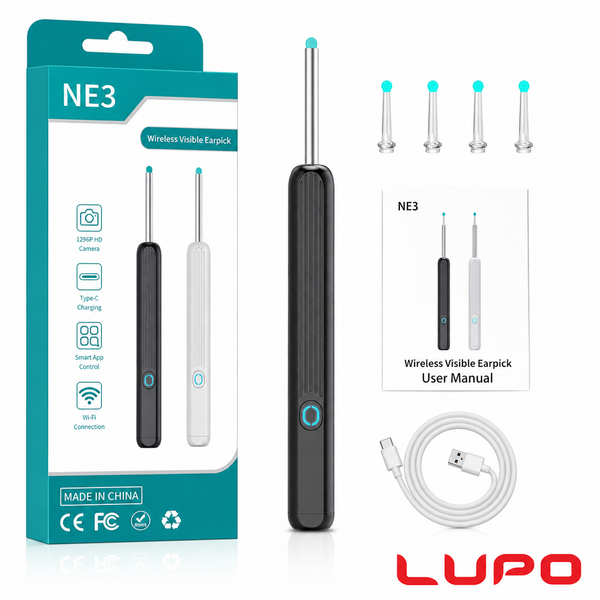
Take the guesswork out of ear cleaning with this high-definition wireless otoscope. Its 1080P HD camera paired with six adjustable LED lights delivers crystal-clear, real-time images of your ear canal, while the built-in 360° gyroscope keeps the view stable as you maneuver. Connect via Wi-Fi to the companion app on your iOS or Android device to watch live video and capture photos for safe, thorough cleaning.
- **Clear 1080P imaging:** The 3 mm camera lens provides 1080P HD resolution to capture sharp images and video of your ear canal and other hard-to-see areas.
- **Adjustable LED lighting:** Six built-in LEDs with adjustable brightness illuminate dark areas for accurate inspection without discomfort.
- **360° anti-shake gyroscope:** A smart gyroscope stabilizes the view as you rotate the otoscope, giving you a steady 360-degree perspective for safer navigation.
- **Wireless & app-controlled:** Connects via Wi-Fi to your smartphone or tablet; use the free app to view live images, record video and share with family or your doctor.
- **Safe & comfortable:** Includes soft, medical-grade silicone ear spoons and protective accessories to prevent scratching; suitable for adults, children and pets.
- **Rechargeable & versatile:** A built-in rechargeable battery provides hours of use. This multifunctional otoscope can inspect ears, nose, mouth, teeth and other small areas.